






Azure SQL Database reporting without a report designer
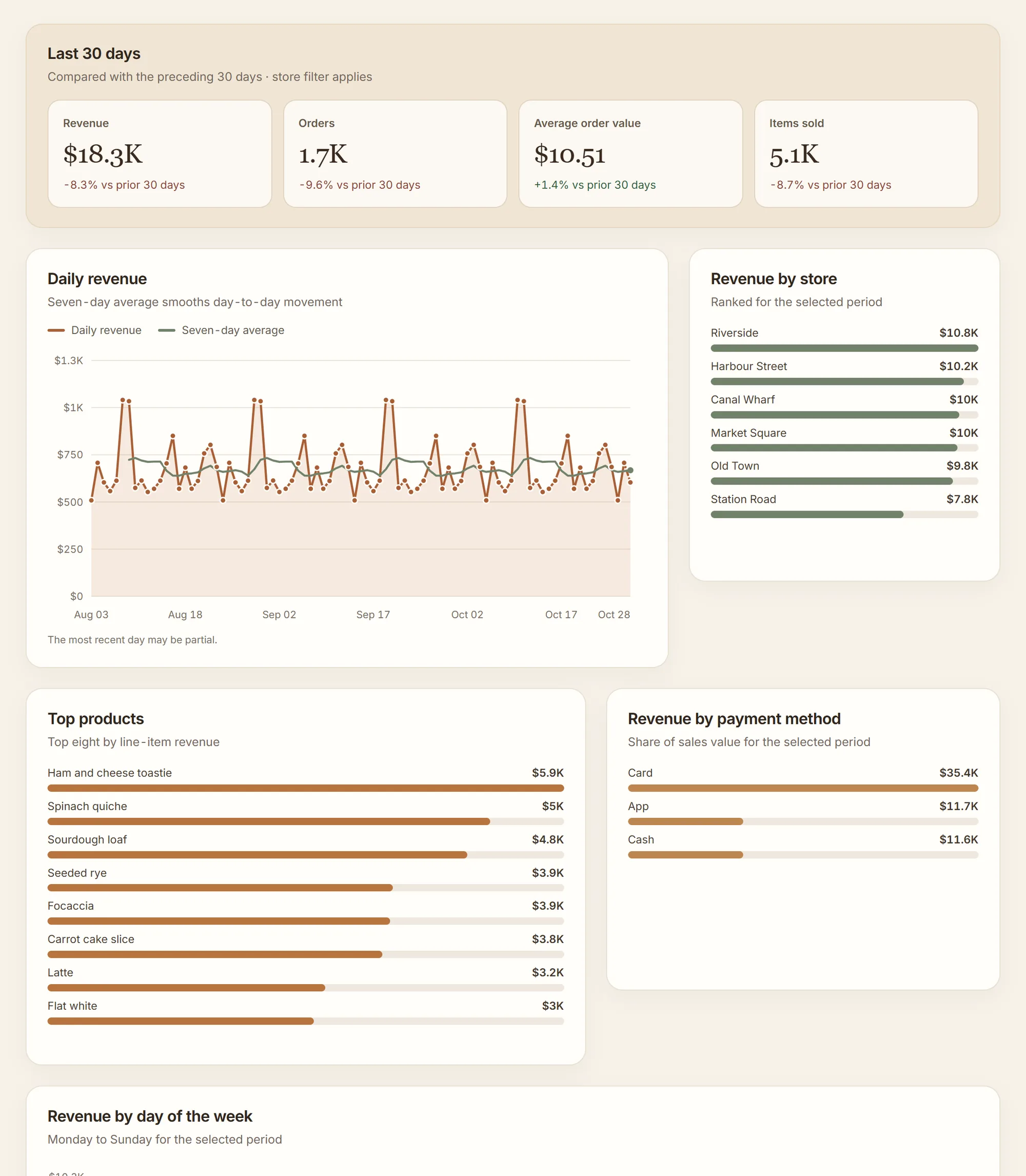
Klyrova is an AI agent for Azure SQL Database reporting. You ask a question in plain language. The agent reads your schema, writes one read-only T-SQL statement, runs it, looks at the result and answers with real rows. When you want to keep an answer, it becomes a live dashboard: a page of figures, charts and tables, each drawn from a dataset that stores the exact query behind it.
Refreshing that dashboard runs the stored queries against your database again. No AI model is called, so a refresh costs no credits, and it gives the same answer every time the data is the same.
Connecting Azure SQL Database
Open Data sources, choose Add source and pick Azure SQL Database. The form asks for:
| Field | What to enter |
|---|---|
| Server | Your logical server, for example myserver.database.windows.net. |
| Port | 1433. |
| Database | The database on that server. |
| Username and password | A contained database user or a SQL login that can only read. Our read-only user guide has the T-SQL. |
| Encrypt connection | On. Azure SQL requires it. |
Let Klyrova through the server firewall
Azure SQL refuses connections its firewall doesn't allow. Klyrova runs in Microsoft Azure, so in the server's Networking settings allow Azure services and resources to access the server. That setting lets in connections from other Azure-hosted services too, so pair it with a strong password on a read-only user. If your policy calls for a narrower rule, write to support@klyrova.app for Klyrova's current outbound addresses.
Password sign-in must be allowed
Klyrova signs in to Azure SQL with a user name and password. If your server is set to Microsoft Entra-only authentication, SQL users can't sign in at all and the connection test fails. Turning that setting off, or creating the database in a server that allows SQL authentication, fixes it. (Microsoft Entra sign-in is how Klyrova connects to Microsoft Fabric, not to Azure SQL sources.)
How Klyrova keeps Azure SQL read-only
- Every statement is parsed with Microsoft's T-SQL parser and must be exactly one SELECT with no
INTO.EXEC,WAITFOR,OPENROWSET,BULK,DBCCand everything that writes are refused before a connection is opened. - Connections ask for
ApplicationIntent=ReadOnly. On Azure SQL tiers with read scale-out, such as Premium, Business Critical and Hyperscale with secondary replicas, that sends Klyrova's queries to a read-only replica instead of your primary. - Queries running longer than 75 seconds are stopped.
A read-only database user is still the lock we recommend most, because the database itself enforces it.
An example
"Show me daily sign-ups for the last 30 days, split by country, as a stacked bar chart."
The agent read the accounts table and kept this query as a dataset on the dashboard:
SELECT CAST(a.created_at AS date) AS day,
               a.country,
               COUNT(*)                   AS sign_ups
        FROM   dbo.accounts AS a
        WHERE  a.created_at >= DATEADD(day, -30, CAST(GETUTCDATE() AS date))
        GROUP  BY CAST(a.created_at AS date), a.country
        ORDER  BY day, sign_ups DESC;
Add a country filter and the query takes the picked countries as a parameter. When a filter is set, Klyrova asks Azure SQL for a fresh plan for that query, so a pick doesn't reuse a plan built for "all countries".
Serverless databases and refresh schedules
An Azure SQL serverless database that pauses when idle wakes up on the first query, which can take a minute; if the first read gives up while it resumes, try again shortly. When you pick tables for a new dashboard, Klyrova says the database may be waking and offers to try again. Keep in mind that a dashboard refreshing every five minutes will keep a serverless database awake around the clock. A daily or hourly schedule, or importing the data model on Pro and Teams, keeps it paused between refreshes.
Import for slow or busy databases
On Pro and Teams, a dashboard's data model can be imported into a fast copy that Klyrova keeps, up to eight times a day at the times and time zone you choose. Filters and refreshes then answer from the copy in milliseconds, and your database is only read during imports. See data models and import.
Azure SQL questions
Which firewall setting does Klyrova need?
Klyrova connects from Microsoft Azure. In the server's Networking settings, allow Azure services and resources to access the server. For a rule naming Klyrova's own outbound addresses instead, ask support@klyrova.app.
Can Klyrova sign in to Azure SQL with Microsoft Entra ID?
Not for Azure SQL sources: they use a SQL user and password, which must be allowed on the server. Microsoft sign-in is used for Microsoft Fabric items.
Will Klyrova use my read replica?
On tiers with read scale-out, yes. Klyrova connects with ApplicationIntent=ReadOnly, which Azure SQL routes to a read-only replica.
Does it work with elastic pools?
Yes. A database in an elastic pool is reached through its logical server name like any other Azure SQL database.
What does it cost?
One data source is free. Pro is $18 a month for five sources and refreshes every five minutes, with more sources at $4 a month each. See pricing.
Updated 30 October 2026