






SQL Server AI that only reads
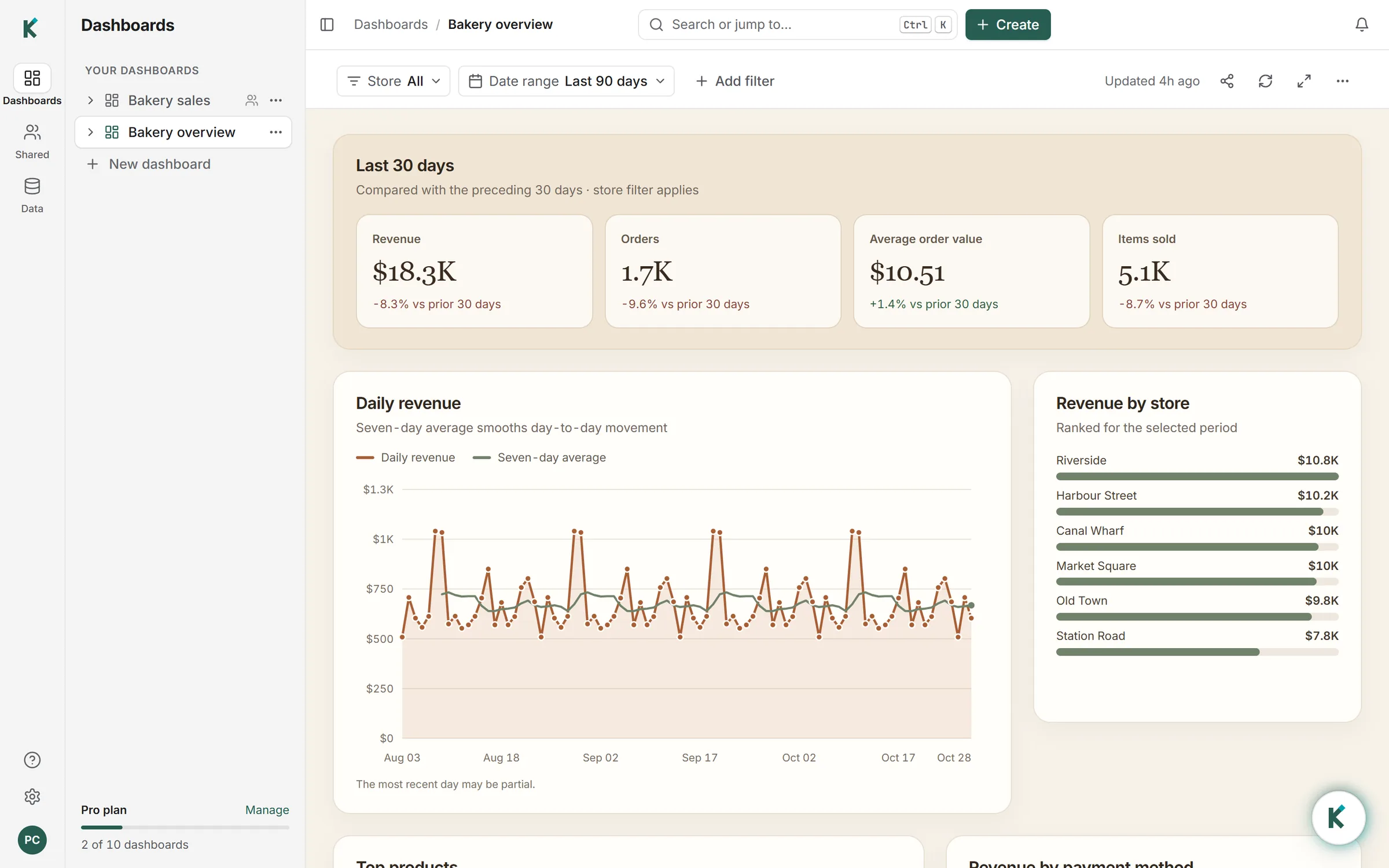
Klyrova brings AI to SQL Server reporting without giving a model write access to your database. You ask in plain language; the agent inspects the schema, writes a single read-only T-SQL statement, runs it and answers with the rows it got back. Keep the answer and it becomes a dashboard: a page of figures, charts and tables, each drawn from a dataset that stores the query behind it.
The dashboard refreshes by running those stored queries again, on a schedule or when someone presses Refresh. The AI isn't involved in a refresh, so it costs no credits and gives the same answer the same data gives anyone running the SQL by hand.
What you can build
- Answers to one-off questions, each with the T-SQL that produced it.
- Operational dashboards that refresh as often as every five minutes on Pro and Teams, once a day on Free.
- Filters (lists and date ranges) bound to the queries as parameters.
- Tables of every row, paged and searched inside SQL Server with
OFFSET … FETCH, so a ten-million-row table stays usable. - Exports to PDF, Excel and CSV, sharing with viewers and editors, and published embeds on Pro and Teams.
- A data model over the tables you pick, with foreign keys turned into relationships.
Connecting SQL Server
Open Data sources, choose Add source and pick SQL Server. You'll need:
| Field | What to enter |
|---|---|
| Host | The server's public host name or address. |
| Port | 1433 unless the instance listens elsewhere. |
| Database | The database the dashboards read. |
| Username and password | A SQL Server login with read access only. See how to create one. |
| Encrypt connection | On by default. |
| Trust a self-signed server certificate | Tick it if your server uses its own certificate rather than one from a public authority. |
Klyrova signs in with SQL Server authentication: a login and password. Windows authentication isn't available, because Klyrova runs in Microsoft Azure rather than inside your domain.
That also means the server has to be reachable from the internet. Klyrova has no on-premises gateway, and it refuses private, loopback and link-local addresses, so an instance that is only visible inside your network needs a public endpoint first, ideally restricted by your firewall. Test the connection before adding it; a new source that fails its test isn't saved.
How Klyrova keeps SQL Server read-only
SQL Server has no read-only session mode a client can switch on, so Klyrova checks every statement itself before a connection is opened:
- The statement is parsed with Microsoft's own T-SQL parser, not matched against a pattern. It must be exactly one SELECT, with no
INTO. T-SQL doesn't need a semicolon between statements, which is why parsing matters:SELECT 1 BACKUP DATABASE …is two statements, and the parser sees both. - A list of refused words covers the rest:
EXEC,WAITFOR,OPENROWSET,OPENQUERY,OPENDATASOURCE,BULK,DBCC,NEXT VALUE FOR,DECLAREand every statement that writes. - Connections ask for
ApplicationIntent=ReadOnly, so where read-only routing is set up in an availability group, Klyrova's queries go to a readable secondary.
The read-only login is the lock that holds even if everything above failed, which is why we recommend it. Queries running longer than 75 seconds are stopped.
An example
"Which warehouses shipped late most often last month?"
The agent found the shipments and warehouses tables and wrote:
SELECT TOP (10)
               w.name                                                        AS warehouse,
               COUNT(*)                                                      AS shipments,
               SUM(CASE WHEN s.shipped_at > s.promised_at THEN 1 ELSE 0 END) AS late,
               CAST(100.0 * SUM(CASE WHEN s.shipped_at > s.promised_at THEN 1 ELSE 0 END)
                    / COUNT(*) AS decimal(5, 1))                             AS late_pct
        FROM   dbo.shipments  AS s
        JOIN   dbo.warehouses AS w ON w.id = s.warehouse_id
        WHERE  s.shipped_at >= DATEADD(month, -1, DATEFROMPARTS(YEAR(GETDATE()), MONTH(GETDATE()), 1))
          AND  s.shipped_at <  DATEFROMPARTS(YEAR(GETDATE()), MONTH(GETDATE()), 1)
        GROUP  BY w.name
        ORDER  BY late_pct DESC;
T-SQL notes
- The agent writes SQL Server's dialect:
TOP,DATEADD,DATEFROMPARTS, square-bracketed names where needed. - A list filter reaches a query as one JSON parameter read with
OPENJSON; dates arrive as typeddateparameters. Values never become SQL text. - Stored procedures can't be run, since
EXECis refused. If a report lives in a procedure, a view over the same logic works. - On Pro and Teams you can import the data model into a fast copy up to eight times a day, so heavy dashboards stop loading your server between imports.
SQL Server questions
Can Klyrova connect to an on-premises SQL Server?
Yes, if the instance is reachable from the internet on its port. There is no gateway to install; restrict the firewall to the traffic you expect and use a read-only login.
Does Klyrova support Windows authentication?
No. It connects with a SQL Server login and password, encrypted at rest and never shown again in your browser.
Can it run stored procedures or write to tables?
No. Only a single SELECT statement gets through the read-only check, so EXEC, INSERT, UPDATE, DELETE, MERGE and SELECT … INTO are all refused.
Will it slow down my production server?
Each dashboard runs its queries when it refreshes and when someone picks a filter. Point Klyrova at a readable secondary, choose a calmer refresh schedule, or import the data model on Pro and Teams to keep production load low.
Is Azure SQL Database different?
It uses the same dialect and checks, with a few Azure specifics around the firewall and sign-in. See Azure SQL dashboards.
Updated 30 October 2026